Blog / Playbooks
Free Board Status Report Template (Word and Excel)
One page, in the order a board reads it: the decisions you need, then each workstream with its colour, its reason and a date.
By Glen Conway, Founder · · 5 min read
Most board status reports start as one page and grow by a row or a paragraph every quarter, until the board reads the first half and asks about the rest in the meeting. This template keeps the report to a single page, in the order the board needs it, and it's free to download with no sign-up.
- Board status report template, Word (.docx)
- Board status report template, Excel (.xlsx), which includes the filled-in example below and works out how many days each milestone has moved
What's in it
| Section | What goes in it | Why the board needs it |
|---|---|---|
| Overall status | One colour and one sentence | They can tell in five seconds whether to worry |
| Headline | Three sentences at most: what changed and what you need | Many members only read this far |
| Decisions needed | Each decision, your recommendation, an owner and a date | Decisions are what the meeting is for |
| Workstreams | One row per area: owner, colour, the reason for it, what changed, the next step and its date | Shows where the plan stands without a list of tasks |
| Milestones | Target date, forecast date and how far it has moved | Slips show up here before any colour changes |
| Risks and help needed | What could go wrong, what it would affect, and who can help | Gives the board something specific to do |
A filled-in example
This one is for Larkspur Freight, the made-up logistics company we use in our demos, and it's also the second sheet of the Excel file.
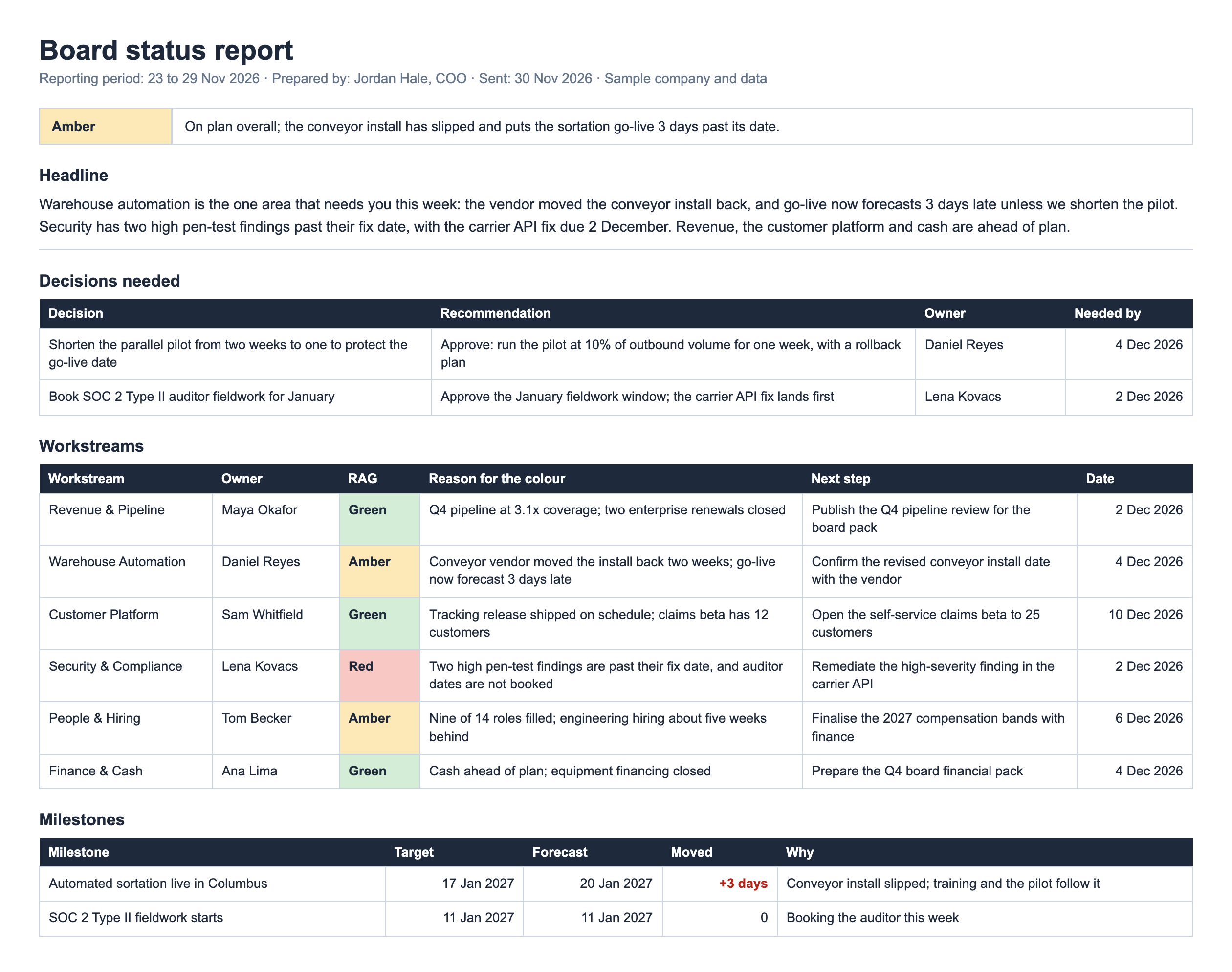
Jordan, the COO, has six workstreams, and four of them are fine. The headline spends its three sentences on the two that aren't, the decisions section asks for the one call that protects the go-live date, and the milestones table shows the sortation go-live forecast three days past its target, which explains why Warehouse Automation is amber even though nothing there has failed yet.
How to fill it in
- Start with the decisions. If the board needs to approve or unblock something, it goes first, with your recommendation and the date you need it by.
- Set each colour with a test the next person would apply the same way. Green means on track for its dates with no blocker that needs leadership, amber means a date is at risk or a blocker needs attention, and red means a committed date will be missed or a decision is needed now.
- Write the reason next to every colour. "Amber: conveyor install moved back two weeks, go-live forecast 3 days late" gives the board something to act on, and it stops amber from becoming the default.
- Show the dates moving. Keep the target date fixed and update the forecast each time, so a milestone that has quietly slipped twice is visible on the page.
- Keep it to one page. If a workstream needs more than a row, the detail belongs in an appendix or in the meeting.
Mistakes that make board reports long
- Activity lists. Twelve things the team did this month tell the board very little, and one dated next step per workstream tells them more.
- Colours without reasons. A wall of amber with no explanation leads to questions about every row in the meeting.
- No dates. "In progress" can mean next week or next quarter, so give the next step a date and the milestone a forecast.
- Rebuilding it from scratch. Copying last month's report and editing it is how stale rows survive for a year, so check each row against where the work actually is.
Keeping it current
The layout is the easy part. Most of the time goes into chasing owners for updates and checking dates across email, chat and each team's tools, often the night before the board pack is due.
That used to be most of my work on a board report too. Now the information I need is already there when I sit down to write it, so I don't go hunting for it or chase anyone, and the time goes on deciding what the board needs to hear.
Action Log keeps the same scorecard up to date for you. Status and owners sync from the tools your teams already use, owners update their own rows through a magic link, and the weekly brief drafts what changed, so the report is close to ready when you open it. The reports and scorecard help article shows how the scorecard is put together, and you can copy it or export it straight into your board pack.