Blog / Playbooks
How One Overdue Task Moves Your Launch Date
A late task in one workstream can push your launch date well before any status colour changes.
By Glen Conway, Founder · · 5 min read
Most board updates I've seen are a table of workstreams with a colour, a sentence on why and an owner's name next to each one. It works well enough, because board members can read it quickly and they know which rows to ask about.
What the table leaves out is how the rows depend on each other.
Each owner picks a colour for their own area, so when something late in one area is going to push a date further down the plan, the table tends to find out only when the last row finally turns red.
An example
Larkspur Freight is the made-up logistics company we use in our demos, and one of its workstreams is getting a new automated sorter running in its Columbus warehouse before peak season. The steps follow on from each other:
- The vendor installs the conveyor.
- The second-shift leads are trained on it.
- The team runs a pilot on 10% of outbound volume.
- The sorter goes live.
The vendor is waiting on a replacement motor, and the task to confirm the new install date is now twelve days overdue. Daniel, who owns the workstream, has marked it Stuck and posted an update, and he's set the workstream to amber with this note:
Vendor moved installation back; go-live still inside the window.
When he wrote that it was a reasonable read, but then you do the arithmetic. Training can't start until the conveyor is in and the pilot can't start until people are trained, so if those steps still take as long as planned and none of them can run in parallel, everything after the install moves by twelve days.
The plan had nine days between go-live and peak, which means go-live now lands three days after the deadline.
The team may be able to win some of that back by shortening the training or starting the pilot early. That's the discussion Daniel should be having this week, and it's hard to get it started while the status still says "inside the window."
I don't think anyone does this on purpose. The colour is a judgement made once a week about one area, and the late task often belongs to a different team from the date it affects.
What the timeline does
I wanted Action Log to work the dates out before anyone picks a colour, so that's what the Timeline tab under Status does.
Every open action sits on its workstream's row at its target date, and the projection uses one rule: an overdue action finishes today at the earliest, and anything waiting on it still needs the time it was planned with. If the first task is twelve days late, the tasks after it move twelve days too.
The overdue date is the only change it makes to the plan as written. If you know the vendor is delivering on the 4th, or that two steps can overlap, then you know more than the chart does, and that's fine. I use it to decide where to look and then I talk to the owner.
In the image at the top of this post, the red line is the chain causing the slip, starting at #6, the overdue conveyor task. The dashed rings show where each later step now lands, and the dashed red line on the right is the projected finish, three days past the end date.
It only follows dependencies you've recorded on actions, but you don't need to link everything, because the few hand-offs between teams are usually where the risk sits.
Milestones
Most plans have a handful of dates people remember, such as a launch, an audit or a go-live. Mark those actions as milestones and the timeline lists them with their target date and where they're now projected to land, and a late one also names the overdue action holding it up.
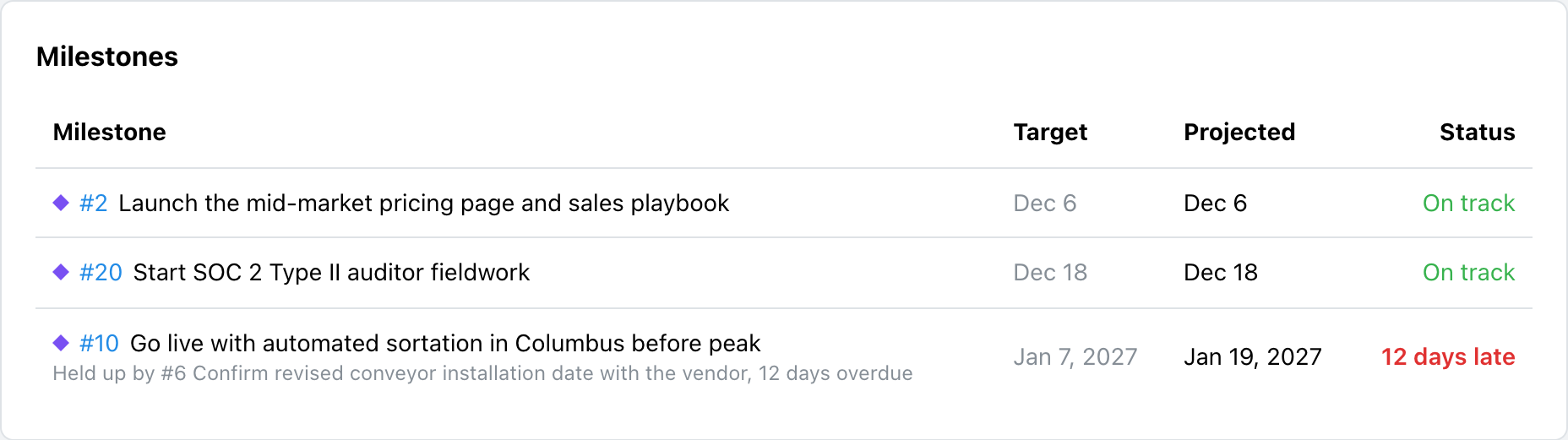
The two numbers measure different things. The milestone is twelve days late against its own target, which was set nine days before peak to leave some room, and those nine days soak up most of the slip, so the finish ends up three days past the deadline.
For Larkspur, that last row tells Daniel which task to chase and gives whoever writes the board update a sentence they can use as it stands.
There's also a small clock next to a workstream's colour when its actions have changed since the weekly snapshot. You still choose the colour yourself, and the clock tells you it was chosen before the latest changes.
Before I send an update
I check three things:
- Are any milestones late, and what's holding them up?
- Where does the red chain start, and does that task need a push, a new date or less scope?
- Is any workstream showing the clock?
Then I set the colours. "Amber: go-live is three days late unless the vendor delivers by the 4th" gives the board something to work with, and it tells Daniel's team the date they need to beat.
If you've connected an AI assistant over MCP, you can ask it which milestones are late and why. You also don't need to open the timeline every day, because Home shows a single line when a milestone slips or the finish moves past the end date and stays quiet while the dates hold.
Sometimes the warning is there weeks before the date turns red, in an overdue task no one has connected to the milestone, and it's worth making that connection before the next update goes out. The timeline help article covers the rest.